NDT Simulator for Hands-On UT, PAUT, RT, MT and More — Atlantis Practical NDT
Practical NDT is an online NDT simulator from Atlantis NDT: technicians and trainees practise UT, PAUT, TOFD, RT, MT, PT, VT, ET and more on virtual welds, pipe, vessels and castings in a browser-based 3D environment, with step-by-step procedure feedback. It runs standalone or inside the Atlantis LMS and ERP eLearning portal. Affordable. Accessible. Fully customizable.
Free tool: Ultrasonic A-scan simulator: set gain, range and a gate and read reflector depth on a live A-scan, with a guide to what each control does.
Practise now: free ultrasonic A-scan simulator, in your browser, no sign-up.
Try a simplified UT A-scan
Simplified educational demo — not a validated engineering simulation. In the interactive version you slide a straight-beam probe across a plate that contains one planar reflector. Over sound metal the A-scan shows the backwall echo; over the reflector an earlier echo appears and the backwall drops. Gain, range, a gate (start, width and threshold), thickness and material (carbon steel, stainless steel, aluminium) can be changed, and the gate reports the depth and height of the echo inside it. Open the full-page ultrasonic A-scan simulator, with a guide to gain, range and gates.
Depth is read from the echo time: depth = velocity × time ÷ 2. For example, in carbon steel (longitudinal velocity 5,920 m/s) a 25 mm plate puts the backwall echo at 8.45 µs, and a reflector at 12 mm returns an echo at 4.05 µs.
The geometry is idealised: no beam spread, attenuation, near field, dead zone, couplant or calibration effects. It shows the principle, not what a real instrument on a real part will display. Skills are built on the full Practical NDT simulator and on calibrated equipment in training.
Demo the full simulator — standalone · Demo it inside the ERP · Free calculators: UT angle beam, TOFD
Why practice is the bottleneck: the evidence
Practical skill is the hardest part of NDT qualification to deliver. Every repetition needs a flawed specimen, a working instrument and an instructor’s time, and a rare defect geometry may turn up once a year on a real job.
Reliability research keeps finding that the person doing the inspection is the largest source of variation. MIL-HDBK-1823A, the US Department of Defense handbook on the reliability of NDE systems, states that “in many applications the human conducting the inspection is the most significant variable in the process” (MIL-HDBK-1823A, 2009). In the UK HSE PANI 3 programme, 40 operators inspecting the same welded test pieces achieved average detection frequencies of 58% to 67% per test piece (HSE Research Report RR617, 2008).
Practical NDT was built so that a technician can repeat complete, procedure-driven inspections, with every attempt recorded.
How an attempt is checked
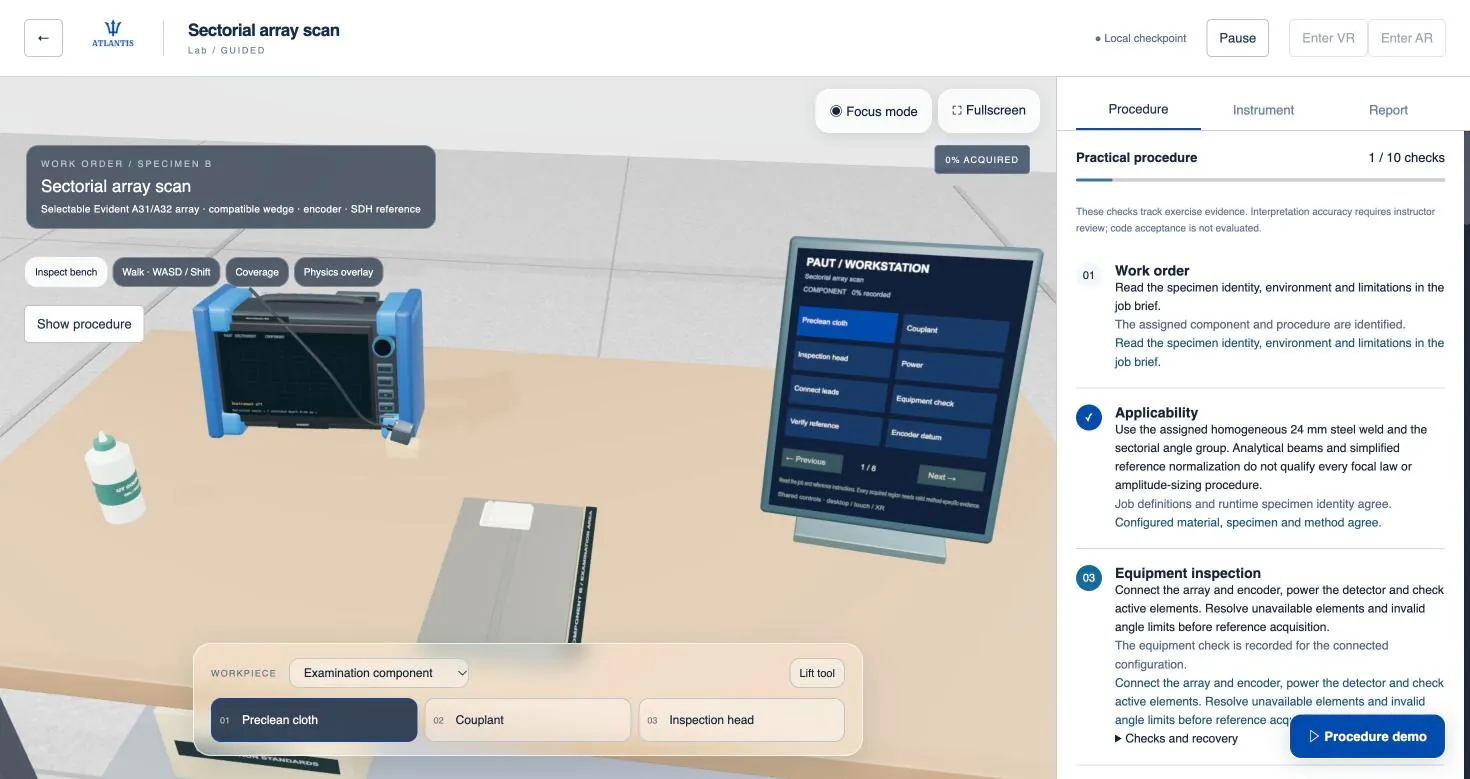
Every practical follows the same twelve-step procedure, from the work order and confirming that specimen, material and method agree, through calibration on the reference, the examination and a data-quality review, to the post-check, the training report and the debrief. A read-only procedure evaluator credits only recorded evidence and withdraws credit for a step that would invalidate a real inspection, such as an unverified calibration or incomplete coverage.
Interpretation is reviewed by the instructor, not scored by the software. Examination specimens carry unidentified reflectors whose key the instructor holds, and the learner record shows the settings, coverage and repeated checks behind each attempt.
Each job runs at three levels of assistance, from guided to independent, so the same job serves first practice, building fluency and rehearsal before an examination:
- Guided: the instruction, the expected result and the recovery for each step
- Coached: the instruction and the recovery; the expected result is hidden
- Independent: the work order only
Inside the Simulator: Environments & Methods
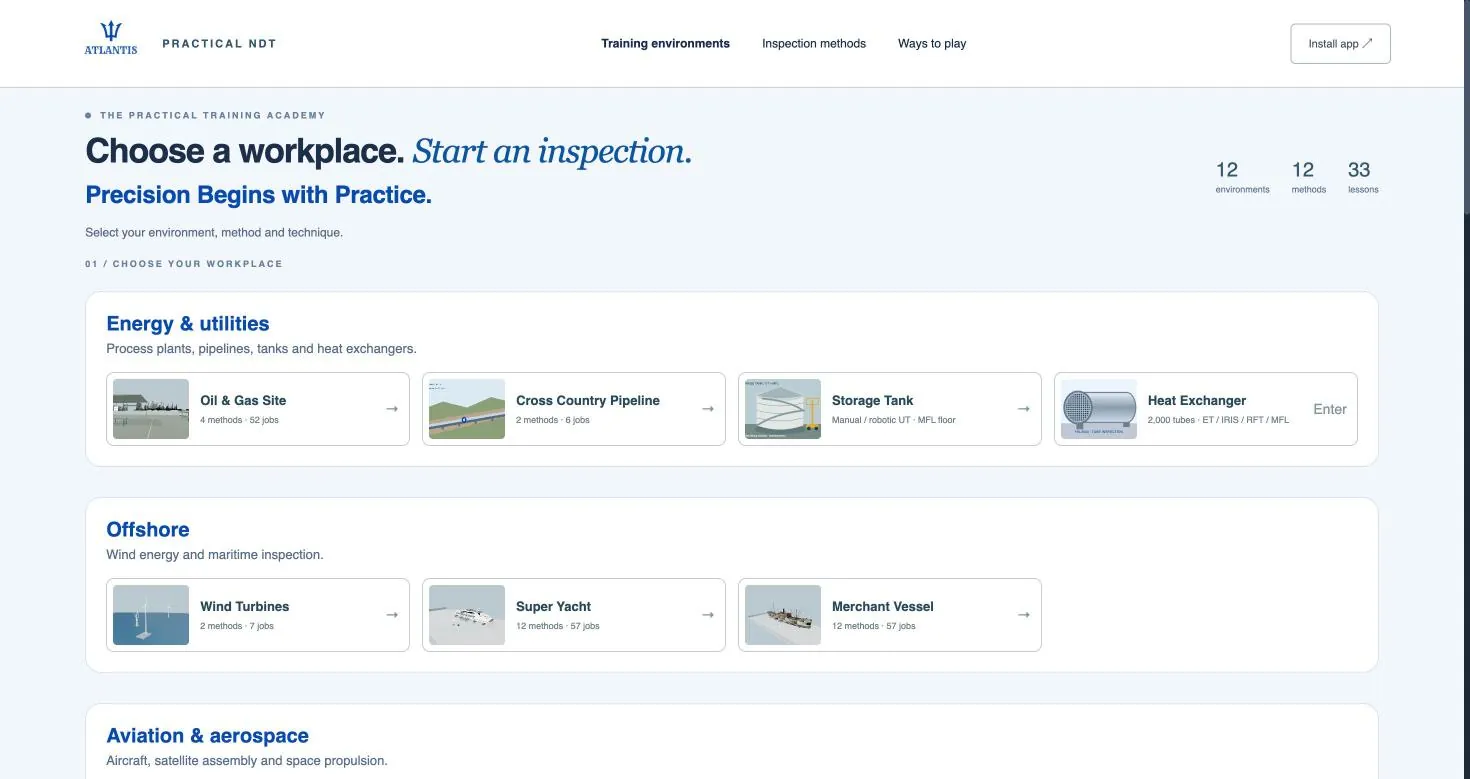
Practical NDT currently offers 12 workplaces, 12 method families and 33 practical lessons, from which the catalogue generates 473 jobs. Choose a workplace, pick a method and technique, and start an inspection. Method and technique availability depends on the environment and the application; new techniques and plant procedures are added regularly.
Five of the twelve workplaces
- NDT Lab: Bench specimens and reference blocks for learning each method from first principles.
- Welding Workshop: Weld coupons and fabrication joints inspected the way a shop QC technician does.
- Aircraft Hangar: Airframe and component inspection in a maintenance-hangar setting.
- Oil & Gas Site: Weld, corrosion, tube and screening practice within a process-plant setting.
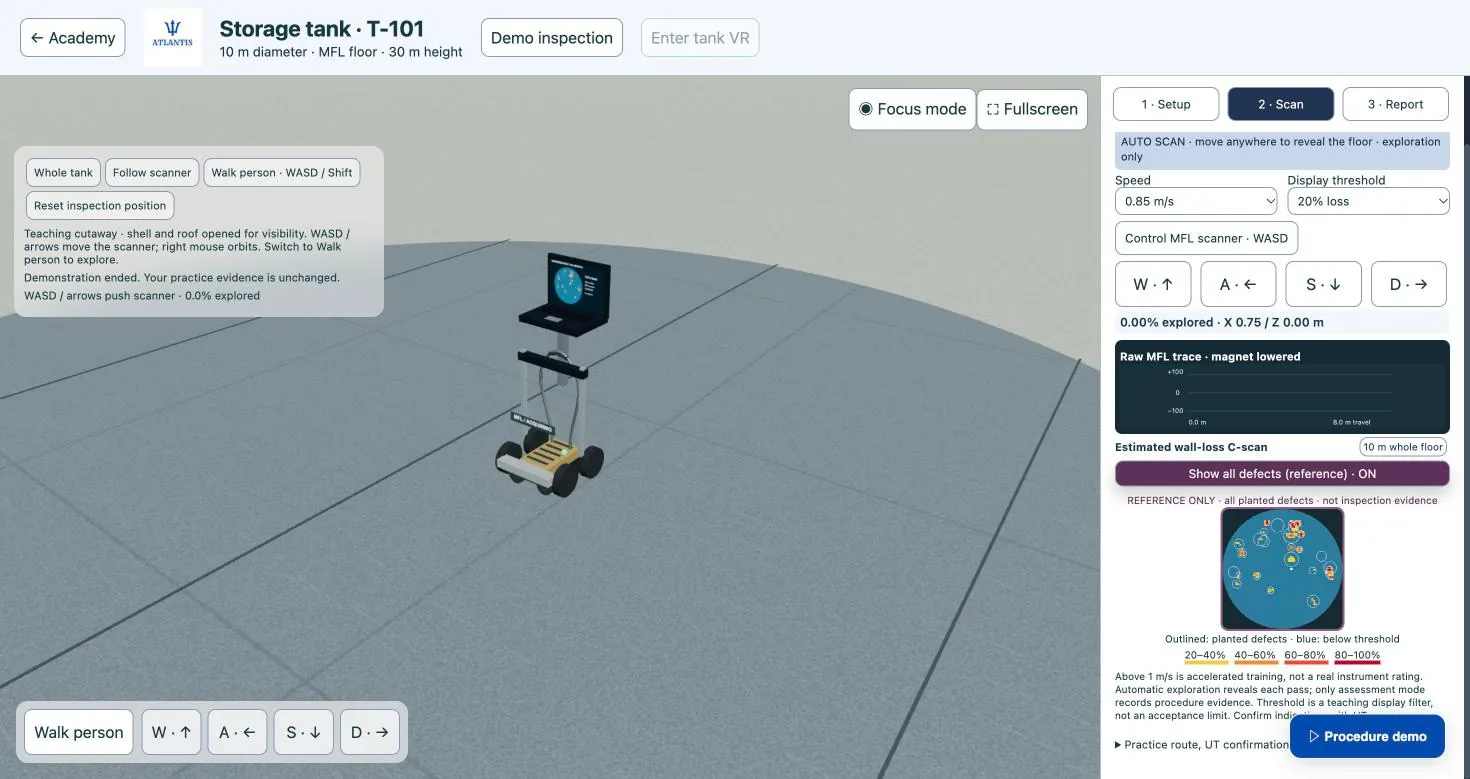
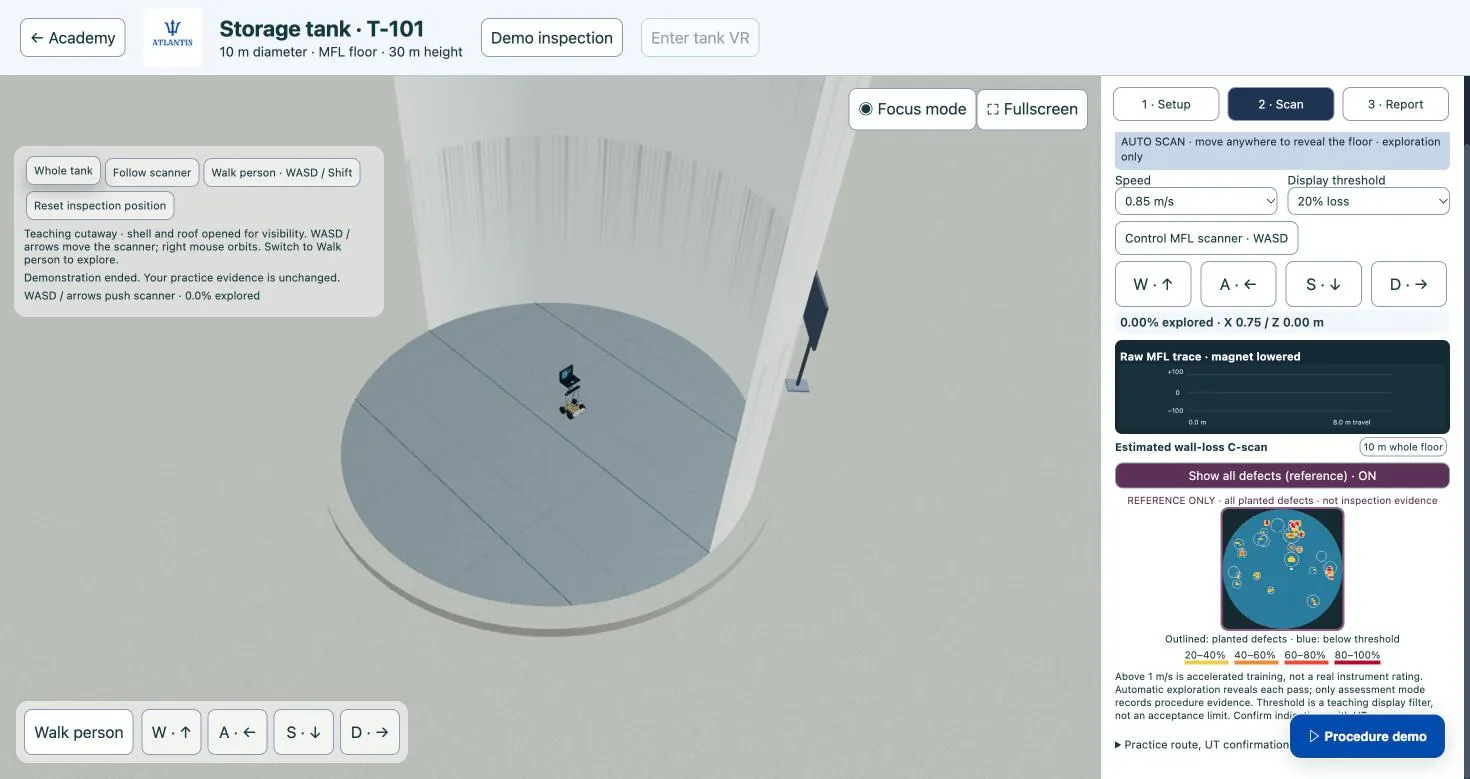
- Storage Tank (UT shell thickness and MFL floor screening): Tank shell thickness surveys and floor screening on a full-size tank.
Surface methods
- PT — Liquid penetrant: surface-breaking cracks and porosity on welds and machined parts.
- MT — Magnetic particle: surface and near-surface cracks in ferromagnetic welds and castings.
- VT — Visual examination: weld profile, corrosion, damage and access limitations.
Volumetric methods
- UT — Contact ultrasonics: thickness readings and flaw detection in welds and plate.
- PAUT — Phased array: sectorial weld scans and flaw sizing.
- TOFD — Time of flight diffraction: weld flaw detection and through-wall sizing.
- RT — Industrial radiography: volumetric inspection of welds and castings.
Electromagnetic methods
- ET — Eddy current: surface cracks and conductivity checks on non-ferrous and aircraft parts.
- MFL — Magnetic flux leakage: wall-loss screening of tank floors and pipe.
Screening and specialist methods
- LRUT — Guided-wave screening: long-range screening of pipe runs from one location.
- IRIS — Internal rotary ultrasonics: tube wall inspection in heat exchangers and boilers.
- PMI — Positive material identification: alloy verification of pipe, fittings and welds.
Practise by method
Twelve method families and 473 catalogued jobs. Each core method has its own simulator page; the specialist techniques (IRIS, MFL, guided wave and PMI) are covered on the workplace pages where they run.
- UT: Ultrasonic testing (208 jobs): normal beam, angle beam, thickness
- PAUT: Phased array UT (18 jobs): sectorial and linear scans
- TOFD: Time-of-flight diffraction (9 jobs): two-probe weld scanning
- RT: Radiography (48 jobs): film, CR and DDA
- MT: Magnetic particle testing (49 jobs): AC and DC yoke
- PT: Penetrant testing (41 jobs): visible and fluorescent
- VT: Visual testing (17 jobs): direct, borescope and drone
- ET: Eddy current testing (33 jobs): absolute, differential, bobbin, bolt-hole
- IRIS: Internal rotary inspection (8 jobs): tube wall, on the heat exchanger page
- MFL: Magnetic flux leakage (16 jobs): tank floor scanning, on the storage tank page
- LRUT: Guided-wave (long-range UT) (18 jobs): pipe screening, on the process plant page
- PMI: Positive material identification (XRF) (8 jobs): alloy checks, on the process plant page
Practise by workplace
Twelve workplaces: ten in the shared catalogue and two dedicated installations, the storage tank and the heat exchanger. Six have their own page.
- NDT laboratory: bench specimens and reference blocks
- Welding workshop: weld coupons and fabrication joints
- Aircraft hangar: airframe and component inspection
- Oil and gas site: weld, corrosion, tube and screening work
- Storage tank: dedicated installation: floor and shell
- Heat exchanger: dedicated installation: tube inspection
Also in the catalogue: a cross-country pipeline, an offshore wind installation, a superyacht, a merchant vessel, a satellite assembly hall and a space propulsion facility. Ask for their job lists in a demo.
What an NDT simulator can and cannot do
A simulator makes practice abundant, recorded and consistent. It does not turn a screen into a flaw detector.
What it can do
- Repeat a complete, procedure-driven inspection as often as needed, at any hour, without booking a specimen or an instrument.
- Refuse to credit the procedural errors behind many site findings: an unverified calibration, incomplete coverage, a scan that is too fast, a single field direction, a skipped post-check.
- Keep a learner record of every attempt, with settings, calibration values, coverage and observations, for a focused instructor debrief.
- Let a technician rehearse a rarely used technique before mobilising for the job.
What it cannot do
- Reproduce the feel of couplant and probe pressure, rough or curved surfaces, real electronic noise, heat, poor light, awkward access or the weight of PPE.
- Replace real specimens for interpreting real signals from real flaws, or hands-on practice on real instruments.
- Act as a validated engineering tool: its signal models are analytical teaching approximations and its training report does not evaluate code acceptance.
- Stand in for experience hours or the practical examination: simulator time is recorded as training, not experience.
Built for Every Skill Level
New trainee: guided scenarios build probe manipulation, scan-pattern discipline, and defect-recognition fundamentals before a trainee ever touches a real specimen. Working technician: between real assignments, scenario libraries targeting rare and hard-to-source defect types keep a working technician's eye sharp without waiting for the right job to come along. Level III / team lead: build and assign scenario sets for your own crew, compare technicians on the same jobs under the same evidence rules, and identify coverage gaps before an audit or a real job finds them.
Complements Formal ASNT Training — Never a Substitute
Practical NDT is a skills-practice and readiness tool. Certification under ASNT SNT-TC-1A or an employer's written practice still requires the supervised practical examination on real specimens that the standard mandates — nothing about that changes. What Practical NDT does is get a technician to that exam, and to real assignments, with far more repetition behind them than limited specimen access would otherwise allow. It sits alongside Atlantis's NDT training and certification programs — built for employer-based ASNT SNT-TC-1A certification — as a practice layer that reinforces what's taught in the classroom and on the shop floor, and keeps it sharp long after the course ends.
Where We Deliver Practical NDT
Rolling out first across North America, then Europe, Australia, New Zealand, Japan and Singapore, and India, the Middle East, Africa and Southeast Asia. Browse Houston, Calgary, Aberdeen, Singapore, Dubai, Mumbai and more — or request a demo regardless of location, since the platform is browser-based and deploys anywhere.
Request a Demo
Atlantis NDT publishes no pricing — pricing varies by region, team size and scope. Tell us the methods and skill levels you want to cover, and we'll walk you through the simulator on those exact scenarios. Request your free demo with Atlantis NDT founder Anoop Rayavarapu (ASNT NDT Level III in UT, RT, MT, PT and VT). Affordable, accessible, fully customizable — quote on request. See also NDT training and certification, consulting services, Atlantis ERP, Digital Twins.
What is an NDT simulator?
An NDT simulator is software that lets an inspector practise a nondestructive testing method on a virtual part instead of a physical specimen: placing and moving a probe, yoke or camera, reading the instrument display, finding indications, sizing them and deciding whether they are acceptable. A good one gives immediate, specific feedback, so every attempt teaches something. The Atlantis Practical NDT simulator is built for exactly that kind of practice, and Atlantis built it as an online practical NDT simulation portal for practice and hands-on experience: a browser-based, 3D, game-like set of workplaces where trainees and working technicians run real inspection jobs on welds, plate, pipe, tanks, tubes and aircraft components.
It helps to separate three things that all get called "NDT simulation". The first is engineering modelling software, which physicists and Level IIIs use to predict beam coverage or radiographic contrast when they qualify a procedure. That is a design tool, not a place to practise. The second is installed training software, usually tied to one method and often paired with a dummy probe or a dedicated workstation in a classroom. The third is what the Atlantis Practical NDT simulator is: an online practice environment covering many methods, opened in a browser or the app, with scenarios built around what a technician actually does on a job. If you searched for an "NDT simulator", an "ultrasonic testing simulator" or a "phased array simulator" because you want more repetitions before a practical exam or a new assignment, the third category is the one you are looking for.
The scenario library was designed by Anoop Rayavarapu, ASNT NDT Level III and founder of Atlantis NDT, who also leads Atlantis training. That matters because the value of a simulator is in its scenarios: which defects appear, where, in what geometry, and what a technician is expected to notice. If you want to see the scenarios for your own methods, book a Practical NDT demo and we will run them live with you.
Practise NDT without equipment, specimens or radiation
The short answer to "can I practise UT, PAUT or RT online without equipment?" is yes, for the skills that live in your hands, eyes and judgement: scan discipline, coverage, reading the display, recognising indication types and making a call. You cannot learn to set the gain knob on your own flaw detector from a browser, and nobody should claim you can. But a large share of practical-exam failures and field mistakes come from pattern recognition and procedure discipline, not from not knowing where the buttons are.
Physical practice has three hard limits. Flawed specimens with documented defects are costly, they are shared, and once a trainee has seen a specimen a few times they remember where the flaw is rather than finding it. Lab time competes with production work and with the instructor's calendar. And radiography practice in the real world means a licensed source, a controlled area and dose to manage, which is why most RT trainees get far less hands-on time interpreting images than they need. In the simulator, none of those limits apply. A trainee can run the same weld job ten times on a Saturday, a technician can drill rare defect types they may meet once a year, and an RT trainee can work through image interpretation with no source in sight.
Method-by-method practice in the Atlantis Practical NDT simulator
The simulator currently covers 12 methods grouped the way inspectors think about them: surface (PT, MT, VT), volumetric (UT contact, PAUT, TOFD, RT), electromagnetic (ET, MFL), and screening and specialist methods (LRUT, IRIS, PMI). Method and technique availability depends on the environment and the application, and new techniques and plant procedures are added regularly. Below is what each method is used for in the simulator and the real-world skill the practice builds toward. If you need to know exactly which set-up and calibration steps a particular lesson walks through, ask during the demo: we would rather show you than overstate it.
Ultrasonic testing (UT): weld scanning and thickness gauging
Contact UT in the simulator covers thickness readings and flaw detection in welds and plate. For weld work, the skill being built is the one every Level II practical tests: choosing the scan surface, covering the weld volume and heat-affected zone with a disciplined raster pattern, recognising when a signal is geometry rather than a flaw, and locating and sizing what is real. In the field that sits on top of a sensitivity set-up, typically a distance-amplitude correction (DAC) curve or time-corrected gain (TCG) built from reference reflectors; DAC and TCG are not yet part of the simulator's practice runtime, so that sensitivity set-up is learned in the course and on real reference blocks, while the simulator's two-reference calibration step builds the habit of calibrating before any scan is credited. For thickness gauging, the practice is grid discipline and recognising readings that do not make sense, such as a sudden drop that could be a lamination or a doubled reading on heavily corroded material.
Phased array (PAUT): reading the S-scan
PAUT practice centres on sectorial weld scans and flaw sizing. Most new PAUT technicians can push an encoder along a weld; what they struggle with is reading the sectorial image: telling root geometry and cap signals from lack of fusion, following an indication through several angles, and sizing it consistently. Repeated S-scan reading against known answers is precisely the kind of practice that is hard to get on real equipment, because there are only so many flawed welds in any lab.
Time-of-flight diffraction (TOFD)
TOFD in the simulator is used for weld flaw detection and through-wall sizing. The skill is interpreting the grey-scale image: lateral wave, back-wall, upper and lower tip diffraction, and the phase changes that separate a planar flaw from a volumetric one. Varied scenarios prepare a trainee for real, noisy scans.
Radiographic testing (RT): interpretation and image quality
RT in the simulator covers volumetric inspection of welds and castings. The value for most people is interpretation: recognising porosity, slag, lack of penetration, cracks and casting defects, and doing it in a structured way. In real interpretation the first question is always whether the image is good enough to judge, which is what the image quality indicator (IQI) placement and sensitivity check is for, along with density and identification markers. An interpreter who skips that step can accept a weld on a film that should never have been read. Because the simulator needs no radiation source, RT trainees can spend their practice time on reading images rather than waiting for a licensed shot.
Magnetic particle (MT) and liquid penetrant (PT)
MT practice covers surface and near-surface cracks in ferromagnetic welds and castings; PT practice covers surface-breaking cracks and porosity on welds and machined parts. These look like the easy methods, and that is why they produce so many missed indications in the field. The procedural habits matter: field direction and the second shot at roughly ninety degrees for MT, surface preparation, dwell time and development time for PT, and the difference between a relevant indication and a false one. Repetition in the simulator builds those habits before a trainee is let loose on production welds.
Visual testing (VT)
VT practice covers weld profile, corrosion, damage and access limitations. Visual inspection is the method every other method relies on, and the one most often rushed. The practice target is a systematic look: undercut, overlap, excess reinforcement, arc strikes, spatter, misalignment and corrosion, noted and judged against the acceptance criteria rather than skimmed.
Eddy current (ET) and magnetic flux leakage (MFL)
ET covers surface cracks and conductivity checks on non-ferrous and aircraft parts, which ties it closely to the Aircraft Hangar environment. MFL covers wall-loss screening of tank floors and pipe, and on the Storage Tank environment it is used for floor screening on a full-size tank. Both methods reward a technician who understands what the signal is telling them and when a call needs follow-up with another method.
Guided-wave screening (LRUT), internal rotary UT (IRIS) and PMI
These specialist methods are where most technicians have the least hands-on time, which is why they are included. LRUT covers long-range screening of pipe runs from one location. IRIS covers tube wall inspection in heat exchangers and boilers. PMI covers alloy verification of pipe, fittings and welds. Each appears in the settings where it is actually used, such as process-plant piping and exchanger bundles on the Oil & Gas Site.
Five of the simulator’s workplaces
The Atlantis Practical NDT simulator offers 12 workplaces and 33 practical lessons; five of the workplaces are described here. Each environment is a different kind of job site, so a trainee practises a method in the context they will actually use it.
| Environment | What you inspect | Catalogue | Best fit |
|---|---|---|---|
| NDT Lab | Bench specimens and reference blocks | Shared catalogue | Learning each method from first principles; new trainees and refreshers |
| Welding Workshop | Weld coupons and fabrication joints, inspected the way a shop QC technician does | Shared catalogue | Fabrication shops, pipe spools, structural steel, weld-heavy practical exam preparation |
| Aircraft Hangar | Airframe and component inspection in a maintenance-hangar setting | Shared catalogue | Aerospace and MRO technicians, ET and surface-method practice |
| Oil & Gas Site | Weld, corrosion, tube and screening practice within a process plant | Shared catalogue | Refinery, petrochemical, pipeline and turnaround work, including IRIS, LRUT and PMI |
| Storage Tank | Tank shell thickness surveys and floor screening on a full-size tank | Dedicated installation: UT shell thickness and MFL floor screening | Tank inspection crews and technicians supporting tank inspection programmes |
The practical way to use the table is to match the environment to the work. A shipyard or fabrication technician lives in the Welding Workshop and leans on UT, PAUT and TOFD. An aerospace technician starts in the Aircraft Hangar with ET, PT and VT. A refinery technician heading into a turnaround spends time on the Oil & Gas Site with IRIS, PMI and corrosion work, then on the Storage Tank. Anyone new starts in the NDT Lab. If you are not sure which mix suits your team, ask us to map your methods to the environments.
Preparing for the NDT practical exam
A simulator is a good way to prepare for a practical exam and a poor way to try to avoid one. The Atlantis Practical NDT simulator is a practice and readiness tool. It does not certify anyone, it does not count as a certification examination, and it is not a substitute for the practical examination on real specimens that ASNT SNT-TC-1A and your employer's written practice require. What it does is put far more repetitions behind a candidate before that exam than limited specimen access would otherwise allow.
SNT-TC-1A employer practicals (USA and employer-based schemes)
Under ASNT's Recommended Practice SNT-TC-1A, certification is employer-based. The employer's written practice sets the training hours, experience hours and examinations, and the practical examination is given on real specimens, with the candidate demonstrating that they can operate the equipment, follow the procedure, and record and evaluate results. The examiner is looking at technique, coverage, documentation and the final call, not just whether the candidate found the flaw. Those are the habits the simulator drills. Atlantis training is built around this employer-based SNT-TC-1A model; see SNT-TC-1A training and certification and, for employers who need their written practice in order first, written practice development.
Central certification schemes elsewhere (context only)
Outside the employer-based model, many technicians sit central certification examinations. ISO 9712 schemes, such as PCN in the UK, run practical examinations on specimens containing documented discontinuities at examination centres. In Canada, certification to CAN/CGSB-48.9712 is issued by Natural Resources Canada and, since late 2024, also by CWB Group. Employers in Europe, Canada, Australia and the Middle East may require one of these schemes. Atlantis does not train toward, administer or issue any of them; we mention them because a candidate preparing for a specimen-based practical exam under any scheme faces the same core problem, which is not enough time on flawed parts.
What simulated practice changes, and what it does not
- It changes how many indications a candidate has seen and called before exam day, how disciplined their scan coverage is, and how familiar they are with reading A-scans, S-scans, TOFD images and radiographs.
- It does not change the required classroom hours, the required on-the-job experience hours, the vision examination, or the need to pass the practical on real specimens with real equipment under a qualified examiner.
- It does not replace hands-on time with your own instruments. Calibrating your own flaw detector, handling couplant on a hot pipe and working at height are learned on the job.
Simulator vs physical flawed specimens
Physical flawed specimens are the gold standard for practical examinations and should stay that way. The question for most employers and training centres is not "simulator or specimens" but how to use each for what it does best.
| Factor | Physical flawed specimens | Atlantis Practical NDT simulator |
|---|---|---|
| Role in certification | Required for the practical examination | Practice and readiness only; never an examination |
| Real equipment handling | Yes, with your own instrument and probes | No; builds technique, coverage and interpretation |
| Variety of defects | Limited by how many specimens you own | 473 jobs across 12 workplaces and 12 method families |
| Answer memorisation | A known risk once a specimen has been seen | Varied scenarios reduce it |
| Rare and hard-to-source defects | Costly or impossible to stock | Practised on demand |
| Radiation | RT practice needs a licensed source and controlled area | None; interpretation practice without exposure |
| Access | One trainee per specimen, in the lab | Browser or app, wherever the trainee is |
| Feedback | Depends on an instructor being present | Immediate feedback on every procedure step; interpretation reviewed by the instructor |
A sensible pattern is to let the simulator absorb the high-volume repetition, then spend scarce specimen and instructor time on what only physical practice can teach: instrument set-up, real couplant and surface conditions, and the final mock practical. Specimens stay fresh for the exam because candidates have not been drilling on them for weeks.
Who uses an NDT simulator
Trainees and career changers
New trainees use guided scenarios to build probe manipulation, scan-pattern discipline and defect-recognition fundamentals before they touch a real specimen. The 33 guided lessons give structure, and progress tracking shows what has been mastered and what has not.
Working technicians
Skills fade between assignments. A technician who has spent six months on thickness surveys may be rusty on weld interpretation; one moving from fabrication to a refinery may never have run IRIS on a real bundle. Scenario libraries targeting rare and hard-to-source defects keep a working technician sharp without waiting for the right job to come along.
Level IIIs, QA managers and employers
Level IIIs and team leads can build and assign scenario sets for their own crews, compare technicians on the same jobs under the same evidence rules, and find coverage gaps before an audit or a real job finds them. Common uses are pre-hire skills checks (does this candidate actually read an S-scan the way their CV says?), refreshers before a shutdown or new contract, and a common measure of procedural competence across crews in different locations. None of this replaces the employer's certification process; it gives the Level III better information while running it. For wider team training, see corporate NDT training.
Training centres and schools
Training centres can use the simulator as homework between classroom sessions, as a warm-up before lab sessions, and as a way to give every student more repetitions than the specimen inventory alone allows. It sits alongside classroom instruction and supervised lab work. Training centres interested in using it with their own students can request a training-centre walkthrough.
Browser-based NDT simulator vs installed simulator software
Installed NDT simulators are typically licensed per workstation, focused on one or two methods, and often paired with dedicated hardware such as a dummy probe or touchscreen mock-up. That approach has real strengths in a classroom where an instructor controls the session, and it is a legitimate category. Its limits are reach and breadth: practice happens where the workstation is, and adding methods usually means adding products.
The Atlantis Practical NDT simulator takes the other route. It runs in a browser or the app, with nothing to install on a training-room PC, and it covers 12 method families across 12 workplaces in one place. A trainee can practise at home, a technician can practise in a site cabin between shifts, and a Level III can assign the same scenario set to crews in different cities. The trade-off is that you are practising with mouse, keyboard or touch, not a physical dummy probe, which is why real-equipment time remains part of every sensible training plan.
Practical NDT around the world
Because the simulator is online, it works wherever your team is. Our regional pages describe the local industries, regulators and certification context, and which environments and methods match the work in each place. Atlantis prioritises North America, then Europe, then Australia and New Zealand, then the Middle East.
United States
State hubs: Texas, Louisiana, Oklahoma, California, Alaska, Colorado, New Mexico, North Dakota, Pennsylvania, Ohio, Illinois, Indiana, Michigan, Wisconsin, Minnesota, New York, West Virginia, Virginia, North Carolina, Georgia, Florida, Alabama, Mississippi, Tennessee, Washington.
Canada
Provincial hubs: Alberta, British Columbia, Saskatchewan, Manitoba, Ontario, Quebec, New Brunswick, Nova Scotia, Newfoundland and Labrador.
Europe
Country hubs: United Kingdom, Ireland, Netherlands, Belgium, Germany, France, Norway, Denmark, Sweden, Italy, Spain, Poland.
Australia and New Zealand
Hubs: Australia, Western Australia, Queensland, New South Wales, Victoria, South Australia, Northern Territory, Tasmania, New Zealand.
Middle East
Country hubs: Saudi Arabia, United Arab Emirates, Qatar, Kuwait, Oman, Bahrain.
Not listed? The platform is browser-based and deploys anywhere. Ask for a demo for your region.
Frequently asked questions about NDT simulators
What is the best way to practise ultrasonic testing without equipment?
Use an ultrasonic testing simulator with weld and thickness scenarios, step-by-step procedure feedback and varied defects, then confirm the skills on real equipment and specimens. The Atlantis Practical NDT simulator covers contact UT, PAUT and TOFD for exactly this kind of practice.
Does the Atlantis Practical NDT simulator give me a certification?
No. It is a practice and readiness tool. Certification under ASNT SNT-TC-1A is granted by your employer under its written practice and requires a practical examination on real specimens, plus training and experience hours. The simulator helps you prepare for that exam; it does not replace it.
Can a simulator count toward my required experience hours?
Do not assume so. Experience hours are defined by your employer's written practice or your certification scheme, and they normally mean supervised work with real equipment. Ask your Level III before counting any simulated practice.
Which NDT methods can I practise?
Twelve: PT, MT and VT; contact UT, PAUT, TOFD and RT; ET and MFL; and LRUT, IRIS and PMI. Availability of each method and technique depends on the environment and the application.
Is there a phased array simulator in the platform?
Yes. PAUT scenarios cover sectorial weld scans and flaw sizing, which is where most new PAUT technicians need the most repetition.
Can I practise radiographic film interpretation without a radiation source?
Yes. RT scenarios cover volumetric inspection of welds and castings, so interpretation practice needs no source, no controlled area and no dose.
Do I need to install anything?
No dedicated workstation or installed software is needed. The simulator runs in a browser or the app.
Is it suitable for complete beginners?
Yes. New trainees start in the NDT Lab with guided lessons on fundamentals, and assistance fades from guided to coached to independent as skills develop. Working technicians and Level IIIs use the same platform for refreshers and crew benchmarking.
Can an employer use it for pre-hire skills checks?
Yes, as one input. A Level III can assign scenario sets and compare candidates on the same jobs under the same evidence rules. It should sit alongside, never replace, the employer's own qualification and certification process.
How is it different from engineering simulation software?
Engineering modelling tools predict how a technique will perform, for procedure qualification. The Atlantis Practical NDT simulator is for people to practise inspection jobs and get step-by-step procedure feedback, while the instructor reviews the findings.
Who designed the scenarios?
The scenario library was designed by Anoop Rayavarapu, ASNT NDT Level III and founder of Atlantis NDT, who also leads Atlantis training.
How much does it cost?
Atlantis does not publish pricing. The simulator is affordable, accessible and fully customizable, and quotes are on request, based on your team, methods and scope.
See the simulator on your own methods
Atlantis built an online practical NDT simulation portal for practice and hands-on experience, and the quickest way to judge it is to watch it run on the methods your team uses. Tell us your methods, skill levels and the work you do, whether that is fabrication welds, refinery piping, tanks or airframes, and we will walk you through the matching environments and scenarios. Request a Practical NDT demo, or if you are building a training plan around it, look at NDT training and certification and online NDT training. Affordable. Accessible. Fully customizable. Quote on request.
Practical NDT by state, province and country
Practical NDT runs in a standard browser, so the simulator is available wherever your team works. Each regional page covers the local industries and the methods that match the work there.
US states and Canadian provinces: Texas · Alberta · Colorado · Pennsylvania · Louisiana · Oklahoma · Ontario · California · North Dakota · New Mexico · Washington · Alaska · Illinois · Michigan · Ohio · Indiana · Wisconsin · Minnesota · New York · West Virginia · Georgia · North Carolina · Virginia · Florida · Alabama · Tennessee · Mississippi · British Columbia · Quebec · Manitoba · New Brunswick · Newfoundland and Labrador · Nova Scotia · Saskatchewan
More North American cities: Casper, Wyoming · Cheyenne, Wyoming · Billings, Montana · Salt Lake City, Utah · Reno, Nevada · Las Vegas, Nevada · Phoenix, Arizona · Tucson, Arizona · Portland, Oregon · St. Louis, Missouri · Kansas City, Missouri · Wichita, Kansas · Omaha, Nebraska · Des Moines, Iowa · Baltimore, Maryland · Newark, New Jersey · Boston, Massachusetts · Providence, Rhode Island · Hartford, Connecticut · Portland, Maine · Charleston, South Carolina · Columbia, South Carolina · Little Rock, Arkansas · Louisville, Kentucky · Lexington, Kentucky · Honolulu, Hawaii · Winnipeg, Manitoba · Regina, Saskatchewan · Saskatoon, Saskatchewan · Halifax, Nova Scotia · Saint John, New Brunswick · St. John's, Newfoundland and Labrador · Monterrey, Nuevo León · Tampico, Tamaulipas · Reynosa, Tamaulipas · Veracruz, Veracruz · Ciudad del Carmen, Campeche · Coatzacoalcos, Veracruz · Saltillo, Coahuila · Chihuahua, Chihuahua · Tijuana, Baja California · Querétaro, Querétaro · Idaho Falls, Idaho · Boise, Idaho · Eugene, Oregon · Davenport (Quad Cities), Iowa · Topeka, Kansas · Groton, Connecticut · Bath, Maine · Pittsfield, Massachusetts · Wilmington, Delaware · Trenton, New Jersey · Sioux Falls, South Dakota · Vernal (Uinta Basin), Utah
Other countries and regions: Australia · Bahrain · Belgium · Denmark · France · Germany · Ireland · Italy · Kuwait · Netherlands · New South Wales · New Zealand · Northern Territory · Norway · Oman · Poland · Qatar · Queensland · Saudi Arabia · South Australia · Spain · Sweden · Tasmania · United Arab Emirates · United Kingdom · Victoria · Western Australia
See Practical NDT in 30 seconds

A 33-second look at Practical NDT, captured from the simulator itself: choosing a training environment, guided UT practicals with a procedure checklist, PAUT and radiography bench practicals, eddy current tube inspection on a heat exchanger, MFL tank-floor practice with a C-scan map and UT on an offshore wind platform. Runs in the browser and sits inside the Atlantis LMS and ERP. A practice and training tool, not a validated engineering tool.
Inside Practical NDT: real screens
Screenshots of the simulator as it runs today in the browser. Practical NDT is integrated with the Atlantis LMS and ERP.
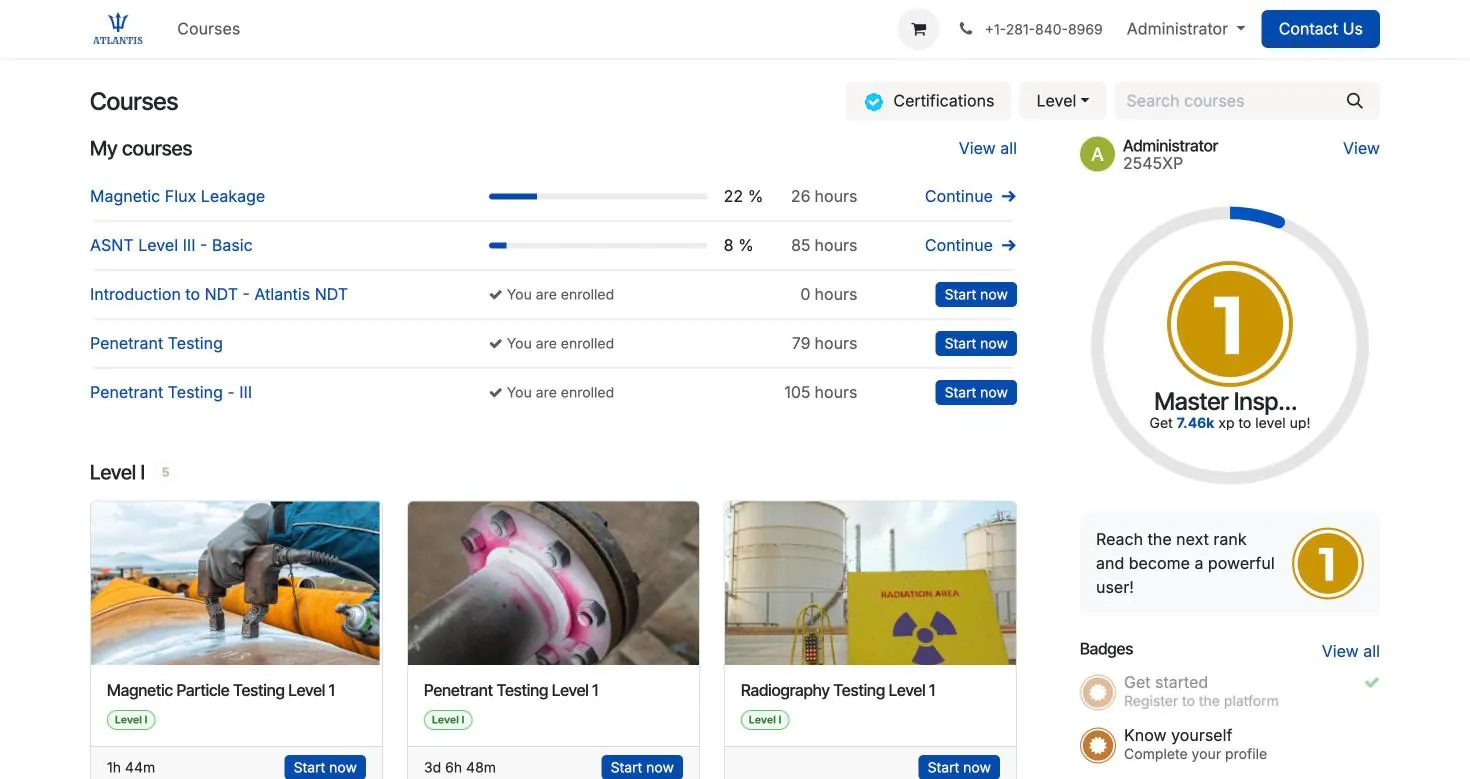
NDT training simulator: what a flaw detector simulator should let you practise
Searches for an NDT simulator, NDT training software, an ultrasonic testing simulator or VR NDT training come from three groups: trainees who want practice between courses, employers who want a crew to rehearse before site work, and training centres that want a virtual lab without more specimens. Note that "ultrasound simulator" on its own mostly finds medical products; the NDT terms are flaw detector simulator and ultrasonic testing simulator.
A useful NDT training simulator lets you practise the steps the practical examination checks. In a Practical NDT UT job that means cleaning the surface, applying couplant, connecting the probe, calibrating on two reference blocks, setting the gates and scanning until the coverage map is complete, following the sound path through the first, second and third legs on angle-beam work. Change the velocity, zero or gain after calibration and the calibration is withdrawn until you recalibrate, and the report stays locked until the post-calibration check is done. Distance-amplitude correction (DAC) and time-corrected gain (TCG) are not yet part of the practice runtime, so they are learned in the course and on real reference blocks. In radiography it means choosing the technique, placing the image quality indicator (IQI) and the film or detector, making the exposure and reviewing the image, which a radiography simulator lets you rehearse without a source before interpreting the film.
- Browser-based, no headset. Atlantis Practical NDT runs in the browser, standalone or inside the Atlantis ERP eLearning portal, so it fits blended NDT e-learning programmes without new hardware.
- Integrated with the LMS and the ERP. Practical NDT is already integrated with the Atlantis LMS and the Atlantis ERP. Learners enrolled in an LMS course open the simulator from that course, so simulator practice, coursework and the company's certification records sit in one system instead of three.
- Methods. UT weld inspection and thickness gauging, PAUT S-scan reading, TOFD, RT interpretation and image quality, MT, PT, VT and ET across twelve workplaces.
- A-scan, B-scan, C-scan and S-scan. Practice reading each presentation, from the single A-scan of conventional UT to the sectorial S-scan of phased array.
- For trainers and employers. Structured practice between courses and before site work. Which scenarios and seats a licence includes is confirmed in the walkthrough.
- What it does not do. It complements formal training and real specimens. Simulator time counts as organised training only where the written practice allows, never as experience hours.
- NDT simulation software for training providers. Training centres, colleges and employers can run it for a whole cohort. Ask for a training-centre walkthrough to see how students are set up and what instructors can review.
Can you practice ultrasonic testing online?
You can practise the decisions online: calibration steps, gain and gate settings, reading A-scans and S-scans, and sizing. You cannot practise couplant, surface condition and probe handling the same way, so real specimens are still needed before the practical examination.
Does the NDT simulator integrate with an LMS?
Yes. Practical NDT is integrated with the Atlantis LMS and the Atlantis ERP, so training providers and employers can put simulator practice inside the same courses and records they already run. It can also be used standalone. The walkthrough shows how a learner moves from an LMS course into the simulator.
Is VR needed for NDT simulator training?
No. Much of the value is in practising decisions and interpretation, which works on an ordinary screen. Headset VR adds immersion but is not required for the Atlantis simulator, which runs in a browser.
Is Practical NDT simulation software you have to install?
No. It is browser-based NDT practice, so a student opens it on a laptop and works through jobs without a dummy probe or a lab booking. It includes an A-scan simulator for ultrasonic calibration and flaw finding, an eddy current simulator, and the other published methods. Training centres use it as an NDT training simulator for schools and colleges, between classroom sessions, and individuals use it for NDT practice online.