Best NDT Software and NDT Reporting Software: Nine Platforms Compared by an ASNT Level III
Reviewed by Atlantis NDT founder Anoop Rayavarapu, ASNT NDT Level III in five methods (UT, RT, MT, PT, VT), with 11+ years of international NDT field experience. Nine NDT reporting and management platforms are compared on what each vendor publishes about itself, with Atlantis included on the same terms and every competitor fact linked to its source.
What is NDT reporting software?
NDT reporting software turns field inspection data into signed, method-specific reports for UT, RT, MT, PT, VT, PAUT and other methods. It holds the template, the technician and the instrument behind each result, and the review and approval that release the report to the client. Some products stop at the report; an NDT ERP also runs certifications, dispatch and invoicing.
What does “NDT software” mean? Three kinds of product
Searches for NDT software mix three different products, and most buyers only need two of them. Knowing which one you are shopping for saves a demo cycle.
- Instrument and data-analysis software. Supplied by the equipment maker to set up scans and analyse acquired data, for example Evident’s OmniPC for OmniScan phased array and TOFD files, or Zetec’s UltraVision. It reads the instrument’s data. It does not run your jobs, your technicians’ certificates or your invoices.
- NDT reporting software. Turns field results into signed, method-specific reports, with templates, review and approval. This page compares the platforms in this group.
- NDT inspection management software, often called an NDT ERP. Runs the business around the report: technician certifications, instrument calibration, dispatch, timesheets and invoicing. Atlantis is in this group; our page on NDT inspection software sets out what it covers.
Most inspection companies get the first kind with their instruments and choose one of the other two for everything after acquisition. The comparison below covers the second and third kinds side by side.
Short answer: the best NDT software for a North American inspection company is the one that covers the whole job, from the request to the invoice, without re-keying. On that test the platforms that actually compete are Floodlight, AgileNDT, DRIVE NDT, Zertify, OMS, InspectionBank, Waygate InspectionWorks, the product sold as NDT Reporting Software, and Atlantis. They are not interchangeable: some are reporting tools, some are data platforms, and a few run the business around the report. The table below shows where each one stops.
Disclosure: Atlantis NDT publishes this page and is one of the platforms compared. The comparison is unranked and every competitor fact links to the vendor's own page, so you can check it.
Last reviewed: vendor pages re-checked on 18 October 2026 by Anoop Rayavarapu, ASNT NDT Level III (UT, RT, MT, PT, VT).
NDT inspection software or NDT reporting software?
NDT reporting software captures the inspection and issues the signed report. NDT inspection software, in the sense inspection companies use it, also runs the work around the report: technician certifications, instrument calibration, crew dispatch and the invoice. Several platforms in the table cover part of that span. If you are still choosing the category, our page on NDT inspection software sets out what each kind of product does and does not do.
NDT reporting software compared: nine platforms side by side
| Platform | Deployment | NDT methods | Reporting | Cert tracking | Calibration | Dispatch | ERP / invoicing | Offline mobile | Pricing model |
|---|---|---|---|---|---|---|---|---|---|
| Floodlight Software | Cloud platform with a mobile app for phone or tablet | UT, RT, MT, PT, VT and ET report types | Prebuilt, modified or custom templates; supervisor approval with digital signature; reports referencing API 510/570/653, ASME Section V and AWS D1.1 | Yes: certification tracking (ASNT, PCN and ISO 9712 named) | Yes: equipment calibration records pulled into reports | Yes: scheduling and dispatch by certification and location | Quote-to-cash: quotes, work orders, billing from completed work, customer portal | Yes: stores data locally and syncs on reconnect | Public pricing page; 14-day free trial |
| AgileNDT | Single-tenant; cloud-hosted or on your own infrastructure | MT, PT, UT, visual and rope-access inspection named on its site | Reporting module, technique sheets, AI report review | Yes: Certifications module | Inventory and lifting-equipment modules; confirm calibration-expiry handling in a demo | Work requests; confirm crew-scheduling depth in a demo | Quotes, billing, inventory, customer portal; ERP and accounting integrations, SSO | Describes offline-ready workflows | Public example pricing by deployment scope (single-site, multi-site, enterprise) |
| DRIVE NDT | Cloud | 11+ methods incl. RT, UT, VT, MT, PT, ET, AT | Automatic report creation with measured values imported directly | Personnel management; confirm qualification-expiry logic in a demo | Equipment management; confirm calibration alerts in a demo | Order management: record, assign and track inspection orders | Cost calculation and billing; customer management | Not stated on its site; confirm | Not published; demo on request |
| Zertify (Spinnsol) | Cloud SaaS; data entry on tablet or smartphone | MT, PT, RT, ET, UT, VT | Report generation with digital signatures from project managers and owners | Staff management; confirm certification-expiry tracking in a demo | Device management; confirm calibration tracking in a demo | Planning, scheduling and dispatch | Project and customer management; invoicing not stated on the NDT page | Not stated on its page; confirm | Not published; demo on request |
| OMS Software | Cloud NDT software with a QMS core; no servers to install | UT, RT, MT, PT, VT, ET | Method test-record templates; certificates with QR verification; ISO/IEC 17020 workflows | Level II and III, PCN and CSWIP qualifications with renewal due dates | Equipment tracking with due-date alerts for probes, blocks and sources | Job scheduling and personnel calendar | QMS with CAPA, non-conformance tracking and document control; invoicing not stated | Page states a stable internet connection is required | Not published on the pages reviewed; check with vendor |
| InspectionBank (Eclipse Scientific) | Online server with a disconnected mobile client | Inspection records by method; strongest around UT scan data | Visual reporting, indication recording, component visualisation, client web portal | Employee training, certification and experience records | Asset records: calibrations, maintenance and scheduling | Personnel scheduling | Quoting and invoicing not described | Yes: disconnected client syncs when reconnected | Not published |
| Waygate InspectionWorks | Software platform to acquire, analyse and act on inspection data, with real-time collaboration | Device-centred: Waygate radiography, CT, ultrasonic and remote visual families | Image acquisition, analysis and archiving (Rhythm, DICONDE); AI-based defect recognition (X|approver) | Not the platform focus | Not the platform focus | Not the platform focus | No: an inspection-data platform, not business operations | Depends on the device and application | Not published; demo on request |
| NDT Reporting Software (The Right Software) | Cloud, or private or managed infrastructure | VT, PT, MT, UT, RT and ET reports, plus PWHT and hydro test | Dropdown-driven report forms, PDF export, linked reports under one job | Not stated | Not stated | Jobs and job requests; admin, manager, inspector and client roles | Invoicing described, but listed as upcoming in its FAQ; confirm | Not yet: offline sync listed as upcoming | Not published |
| Atlantis NDT ERP + NDT Reports | Web-based ERP configured for each company, plus an installable offline field app | Method-specific report types incl. UT, PAUT, TOFD, RT, CR, MT, PT, VT, ECT, IRIS, MFL, UTT, PMI, hardness | Draft, review, approve and send workflow with signatures; your own Word, Excel or PDF templates | SNT-TC-1A, CP-189, ISO 9712, PCN and CSWIP records, vision tests, alerts before expiry | Instrument register by serial number, calibration certificates, due-date alerts | Team assignments; blocks double-booking, warns on out-of-calibration equipment | Full ERP: quotations, projects, timesheets, invoicing, purchasing, inventory, CRM | Yes: drafts and photos stored on the device, synced later | USA and Canada plans published on its ERP pricing page; elsewhere quoted on request; free trial |
"Not stated" means the vendor's public page does not describe the capability. It does not mean the product lacks it. Ask for it in the demo and ask to see it working on your own data. Book an Atlantis demo on your own report formats.
Spreadsheets, a reporting tool or an NDT ERP?
Most companies choosing NDT reporting software are leaving Word and Excel. The real choice is how far past the report the software should reach. This is the honest trade-off, without naming vendors.
| What you need | Spreadsheets and Word templates | Reporting-only tool | NDT ERP |
|---|---|---|---|
| Reports in your client’s format | Yes, but every job is a copy of the last one | Usually, through a form or template builder | Yes, from versioned company templates |
| Review and sign-off | Printed, signed and scanned, or chased by email | Built in, with roles for inspector and reviewer | Built in, linked to the job, the technician and the client |
| Who signed, with which certificate | A separate certificate spreadsheet someone has to check | Sometimes a certificate field; depth varies | Certificates, vision tests and expiry status in the same system |
| Instrument and calibration on the report | Typed in by hand, so serials get copied from last week | Depends on the product | Instrument register with calibration records and due dates |
| Work with no signal | Paper first, typed up later | Depends on the app; test it | Offline field app that syncs later |
| Billing the job | Built again in the accounting package | Usually not covered | Timesheets and invoices from the same job record |
| Effort to start | None | Low: sign up and build forms | A scoping and configuration phase |
| Best fit | A very small crew with a handful of report types | Report volume is the only problem | Reports, people, instruments and invoices all need to agree |
The Atlantis ERP is in the right-hand column. If report volume is your only problem, a reporting-only tool from the table above may be the better buy.
Try Atlantis before you talk to sales
Start a free trial and run one real report through it, or book a guided walkthrough on your own report formats with an ASNT NDT Level III. Start the free trial · Book a guided walkthrough
How we compared
We looked at the software through the eyes of an NDT service company owner or Level III, not an IT buyer. Nine criteria decide whether a platform removes work or just moves it:
- Deployment: cloud, single-tenant, on-premise, and what runs on the technician's device.
- NDT methods: which report types exist out of the box, and whether each method has its own fields rather than one generic form.
- Reporting: templates, review and approval, signatures, and whether reports come out in your client's format.
- Certification tracking: scheme, level, method, expiry and vision tests per technician, with alerts before anything lapses.
- Calibration: instruments by serial number, calibration certificates, due dates and warnings when an out-of-date instrument is assigned.
- Dispatch: assigning crews and equipment to jobs without double-booking.
- ERP and invoicing: quotes, timesheets and invoices tied to the job, so the report and the bill come from the same record.
- Offline mobile: whether a technician inside a vessel or tank farm can finish a report with no signal.
- Pricing model: whether the vendor publishes pricing or quotes. We do not reproduce anyone's prices; they change, and the vendor's page is the only reliable source.
Sources were the vendors' own product pages, first read in September 2026 and re-checked on 18 October 2026; cells that had changed were updated. We did not use review-site scores, because most NDT platforms have too few reviews for a score to mean anything, and we did not rank the list. A ranked list of software built for different jobs would tell you more about the author than about the software.
The platforms in brief
Floodlight Software
The reference point in North America. Floodlight covers dispatch and scheduling, a custom form builder, mobile capture that stores data locally and syncs on reconnect, technician certification tracking, equipment and calibration records, job quoting, invoicing and a customer portal. It publishes pricing and offers a free trial, and its homepage states more than a hundred active customers. If your workflow is a standard North American service-company workflow and you want to be live quickly, it is a strong, well-matched choice. See Floodlight alternatives if you need something it does not do.
AgileNDT
Operating since 2011 from Scotland, with a modular product: reporting, certifications, work requests, customer portal, dashboards, quotes, billing, inventory, technique sheets and lifting equipment, plus AI report review. It is single-tenant, hosted in the cloud or on your own infrastructure, and it publishes example pricing by deployment scope. Its strength is controlled report review and release. See AgileNDT alternatives.
DRIVE NDT
A cloud platform built around inspection order management: record, assign and track orders, create reports with measured values imported directly, then calculate costs and bill. It supports 11 or more methods and lists European references such as Applus+ and DEKRA. It does not publish pricing. See DRIVE NDT alternatives.
Zertify (Spinnsol)
Spinnsol’s cloud NDT management software, covering planning, scheduling and dispatch, report generation with digital signatures from project managers and owners, and staff, customer and device management across MT, PT, RT, ET, UT and VT, with data entered on a tablet or smartphone. Its NDT page does not describe offline use or invoicing. See Zertify alternatives.
OMS Software
An Australian cloud NDT platform with a quality-management core, built around ISO/IEC 17020 workflows: method test-record templates, certificates clients can verify by QR code, Level II and III, PCN and CSWIP qualifications with renewal dates, equipment due-date alerts, job scheduling, CAPA and non-conformance tracking. Its page states that a stable internet connection is required.
InspectionBank (Eclipse Scientific)
From Eclipse Scientific in Canada. InspectionBank manages inspection records, scan data files and images, indications, procedures and techniques, employee certifications, asset calibration records and scheduling, with a disconnected mobile client and a client web portal. It is strongest for advanced ultrasonic teams; quoting and invoicing are not described.
Waygate InspectionWorks
Waygate Technologies’ InspectionWorks is a software platform to acquire, analyse and act on inspection data with real-time collaboration, alongside Waygate imaging software such as Rhythm (DICONDE-compliant acquisition and analysis) and X|approver (AI-based defect recognition). It is inspection-data software rather than business-operations software, so it complements, not replaces, the tools that run certifications, dispatch and invoicing.
NDT Reporting Software (The Right Software)
A product literally named NDT Reporting Software, listed on Capterra and SourceForge, run in the cloud or on private infrastructure. Its published features are jobs and job requests, report forms with dropdown fields for the common methods plus PWHT and hydro testing, admin, manager, inspector and client roles, and PDF export; its FAQ lists offline sync as upcoming. It is a reporting tool, not an operations platform.
Atlantis NDT ERP + NDT Reports
Atlantis NDT ERP with its NDT Reports app: method-specific report types for every common method, with a draft, review, approve and send workflow; technician certifications for SNT-TC-1A, CP-189, ISO 9712, PCN and CSWIP with vision tests and alerts before expiry; instrument calibration records; team assignments that block double-booking; and quotations, timesheets and invoicing in the same system. The field app works offline. The companion Digital Twin Reporting Software places results on a 3D model of the asset. It is configured for each company; plans for the USA and Canada are published on the ERP pricing page, it is quoted on request elsewhere, and there is a free trial. It is not the quickest to switch on: expect a scoping and configuration phase.
Who should choose what
- You want a proven North American NDT platform running next month: shortlist Floodlight first, then compare it with AgileNDT.
- Report review, release and audit evidence are your pain point: AgileNDT.
- You run a European-style order-and-billing operation with many methods: DRIVE NDT.
- You manage lifting equipment as well as doing NDT: AgileNDT, which lists a lifting-equipment module.
- You are an inspection body working to ISO/IEC 17020 and want quality-system controls in the same tool: OMS.
- Your work is advanced UT with large scan files: InspectionBank, alongside your instrument software.
- Your fleet is Waygate hardware and your problem is inspection data, not admin: InspectionWorks.
- You want a free trial before any sales call: Floodlight or Atlantis, the two that state a free trial.
- You need only standard report forms online: a reporting-only tool such as NDT Reporting Software.
- You want reporting, certifications, calibration, dispatch, quotes and invoicing in one system shaped around your own formats: Atlantis. Request a scoping call.
- Fewer than about five technicians and a low report volume: well-controlled spreadsheets and templates may still be enough. See NDT reporting software vs Excel.
- You are an owner-operator planning inspection on your own plant (risk-based inspection, corrosion rates, inspection intervals): you need an integrity management system. None of the reporting platforms above replaces one, and Atlantis ERP does not perform those calculations; it delivers the inspection reports and records that such a system consumes.
Marine and class-society report bundles
Ship-repair and offshore work adds a requirement most reporting tools ignore: the surveyor wants one document, not four attachments. In Atlantis NDT Reports, marine mode adds a vessel cover page and photo, the inspection location and dates, and merges the classification-society certificate, the inspector’s Level II certificate and the calibration certificate into the report PDF, with inspection photos laid out two to a row. The class library covers DNV, ABS, Lloyd’s Register, BV, RINA, IRS and ClassNK.
Moving off Word and Excel without losing your formats
The client-facing layout usually stays the same; what changes is where the data comes from. In Atlantis the move runs like this:
- Collect one recent report per method, plus the formats your largest clients insist on. That is the real requirement, more than any feature list.
- Load your Word, Excel or PDF layouts as versioned company templates; where you use Excel, fields are mapped to cells and filled automatically.
- Set report numbering per method and assign inspector, reviewer and approver roles to match your written practice.
- Load technicians and instruments, so the field app shows each technician the jobs and equipment assigned to them.
- Go live one method at a time, starting with the method that produces the most reports.
Test these five things in any trial
- Offline: complete a full report with photos in airplane mode, close the app, reconnect and confirm nothing was lost or duplicated.
- Lapsed certificate: expire a technician’s certificate in the trial and see what the software does when that person is assigned or signs.
- Your own format: rebuild your hardest client template, not the vendor’s sample.
- Review loop: return a report for correction, revise it and approve it, then look at the revision history.
- Exit: export the reports, attachments and underlying records, and open them without the vendor’s software.
Also compared: NDT ERP vs field service software (ServiceTitan, ServiceTrade, Jobber) and NDT ERP vs generic ERP.
Sources
Vendor pages read in September 2026 and re-checked on 18 October 2026:
- Floodlight Software: floodlightsoft.com/ndt-reporting-software/
- AgileNDT: agilendt.com/
- DRIVE NDT: www.drive-ndt.com/en/
- Zertify (Spinnsol): spinnsol.com/products/non-destructive-testing-software/
- OMS Software: omssoftware.com.au/ndt-software/
- InspectionBank (Eclipse Scientific): www.eclipsescientific.com/InspectionBank/
- Waygate InspectionWorks: www.bakerhughes.com/waygate-technologies/ndt-software
- NDT Reporting Software (The Right Software): therightsw.com/ndt-software/
Spotted something out of date? Tell us and we will correct it. To see Atlantis on your own jobs, book a demo or start the free trial. Plans for the USA and Canada are on the ERP pricing page; elsewhere, quote on request.
Best NDT software: frequently asked questions
What is the best NDT software?
There is no single best NDT software; there is a best fit for how your company works. Floodlight is the most complete ready-made platform for North American service companies, AgileNDT leads on controlled report review, DRIVE NDT suits European order-and-billing workflows, InspectionBank suits advanced UT data, and Atlantis fits companies that want reporting, certifications, calibration, dispatch and invoicing in one configured ERP.
What is the difference between NDT reporting software and NDT ERP?
NDT reporting software captures inspection data and issues the report. An NDT ERP also runs the business around the report: technician certifications, equipment calibration, crew dispatch, quotations, timesheets and invoicing. Several platforms in this comparison cover part of that span; check where each one stops before you shortlist it.
Which NDT software works offline in the field?
Floodlight and Atlantis state that data is stored on the device and synced on reconnect, InspectionBank has a disconnected mobile client and AgileNDT describes offline-ready workflows. OMS states that it needs a stable internet connection, and The Right Software lists offline sync as upcoming. Test it yourself: complete a full report in airplane mode, close the app, reconnect and confirm nothing was lost.
Which NDT software publishes its pricing?
Among the platforms compared, Floodlight and AgileNDT publish pricing on their own sites, and Atlantis publishes its plans for the USA and Canada on its ERP pricing page; elsewhere Atlantis is quoted on request. The other vendors reviewed do not publish pricing and offer demos on request.
Does NDT software track technician certifications to SNT-TC-1A?
Floodlight, AgileNDT, OMS, InspectionBank and Atlantis all describe technician certification records. The test is whether the platform can hold your written practice: scheme, level, method, expiry, vision test and alerts before expiry. Atlantis records SNT-TC-1A, CP-189, ISO 9712, PCN and CSWIP certifications with vision tests and alerts ahead of expiry.
How did you compare these NDT platforms?
Each competitor fact was read from the vendor’s own public product page in September 2026, re-checked on 18 October 2026, and is linked in the sources list. Where a vendor page does not describe a capability, the table says "not stated" rather than guessing. Atlantis is the publisher of this page and is included in the table on the same criteria.
Where can operators compare NDE inspection capabilities and pricing?
On each vendor’s own product page; the table above collects nine of them with links, compared on methods, reporting, certifications, calibration, dispatch, invoicing and offline use. Floodlight and AgileNDT publish pricing, Atlantis publishes plans for the USA and Canada on its ERP pricing page, and the others quote on request. Operators planning inspection on their own plant should also compare integrity management systems, which consume the reports these platforms produce.
Is there affordable NDT reporting software for small businesses?
Yes. Reporting-only tools are the cheapest way to replace Word and Excel, and Floodlight and AgileNDT publish their pricing. With Atlantis a small shop can start with reports and certificates only and add other apps later. Plans for the USA and Canada are published on the ERP pricing page, it is quoted on request elsewhere, and there is a free trial to test it on a real report first.
Which NDT reporting software integrates with CMMS systems?
AgileNDT describes connections to ERP, accounting or asset-management platforms, with roles synced from single sign-on. Floodlight’s NDT reporting page describes a quote-to-cash workflow but names no integrations. Atlantis ERP has an open REST API, and connections to systems such as SAP, IBM Maximo, Oracle, Microsoft Dynamics and QuickBooks are scoped per implementation. Whichever you shortlist, ask to see one real job exchanged with your own system.
How do I test offline mode during a software demo?
Put the device in airplane mode, complete a full report with photos and a signature, close the app, then reconnect. Confirm the report arrives once, complete, with nothing duplicated. The Atlantis field app stores drafts and photos on the device and syncs when signal returns; test it the same way.
Can reporting software stop a lapsed technician from signing a report?
Ask to see it rather than taking it on trust. In Atlantis, certificate status is worked out automatically, warning tasks are raised before a certificate or vision test expires, and timesheets warn when a technician’s certificate is not valid. How strictly a lapsed technician is held back from a report step is set during implementation.
Which NDT reporting software is cloud-based and built for field use?
From the vendors’ own pages: Floodlight is a cloud platform with a mobile app that stores data locally and syncs; AgileNDT is single-tenant, cloud-hosted or on your own infrastructure, and describes offline-ready workflows; DRIVE NDT, Zertify and OMS are cloud platforms; InspectionBank runs an online server with a disconnected mobile client; Atlantis is a web-based ERP with an installable offline field app. Test offline use yourself in airplane mode.
Which NDT reporting software offers a free trial?
Floodlight states a free trial on its site, and Atlantis offers one on its free trial page. The other vendors reviewed offer demos on request. Check each vendor’s current terms before you plan the evaluation.
See NDT reporting software output before you shortlist
Comparisons only go so far. Click through a sample digital twin report — twelve thickness locations on a sample tank, three campaigns, corrosion rates and remaining life — to see what NDT reporting software with 3D digital twin output produces. If reporting is one part of a bigger fix, the ERP workflow configurator shows where reports, certifications and calibration fit in one system.
NDT reporting software, method by method
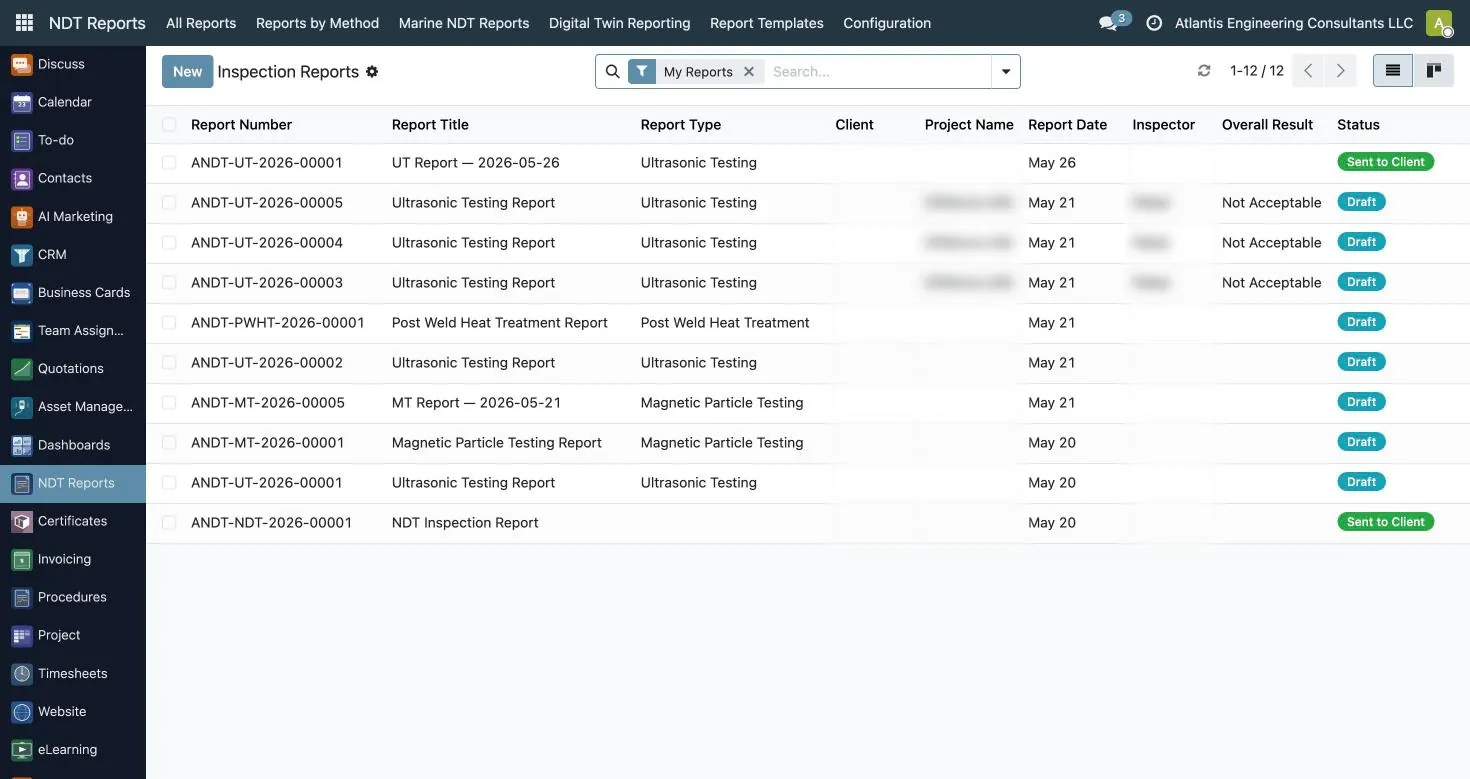
NDT reporting software earns its place when it knows the difference between a UT calibration table and an RT IQI placement. The Atlantis NDT Reports app has its own report type for each method, each with its own number sequence, so your UT reports and your RT reports never share a counter.
| Method | What the report has to capture | How Atlantis NDT Reports handles it |
|---|---|---|
| UT (shear/straight beam) | Instrument, probe, calibration, reference block, indications and evaluation | Dedicated UT report with a probe calibration table and weld/job lines |
| UT thickness (UTT) | Readings by location and direction, nominal and minimum values | UTT report with readings recorded by direction |
| PAUT | Probe, wedge, focal laws, scan plan, indications | PAUT report with focal law data |
| TOFD | Probe pair set-up, scan data, indications | Separate TOFD report type |
| RT and Computed Radiography | Source, technique, IQI type and placement, film or plate details | RT fields for source, technique, IQI type and placement; separate CR report type |
| MT | Technique, particle type, magnetisation details | MT technique and particle type fields |
| PT | Penetrant method, developer, dwell details | PT method and developer fields |
| VT | Visual findings, weld profile, photos | VT report with photo capture |
| ECT, IRIS, MFL | Tube data, scan mode, item lines | ECT and IRIS report types; MFL with scan mode and item lines |
| PWHT, PMI, Hardness, Ferrite, Holiday | Test values against a specification | Each is its own report type with its own sequence |
Every report type shares the same backbone: weld or job lines with defect type and orientation, and an overall result of acceptable, not acceptable, or acceptable with remarks.
UT, UTT and PAUT reports
Ultrasonic work is where most reporting tools fall down, because the report is only as credible as the calibration behind it. A UT report without the probe, frequency, angle and reference block recorded is a report an authorized inspector can reject on sight. In the Atlantis UT report the probe calibration table sits inside the report itself, not in a separate spreadsheet someone has to attach later.
UT thickness surveys are a different animal. A turnaround crew may take hundreds of readings on piping and vessels, and the client wants them laid out so they can compare against the last survey. The UTT report records readings by direction so the grid comes out the way the client expects. The Atlantis ERP does not calculate inspection intervals or remaining life; that analysis belongs to the owner's integrity team or to our Atlantis Digital Twins platform, which trends thickness data in 3D.
PAUT reports carry focal law data so a reviewer can see what the scan actually covered. Because the equipment used on the job is tracked by serial number in the ERP, the report can be tied to an instrument and probe whose calibration status is known on the day of the inspection rather than guessed at when the client asks.
RT and computed radiography reports
Radiography reports are scrutinised harder than almost anything else a contractor issues, because the film or image is the evidence and the report is the map to it. The RT report in Atlantis captures the source, the technique, the IQI type and IQI placement, alongside weld lines with defect type and orientation. Computed Radiography has its own report type and its own number sequence.
For US radiography crews working under NRC or Agreement State licences, and Canadian crews working under CNSC requirements, the people side matters as much as the film. The employee NDT profile in the ERP records radiation safety training, radiation badge number and medical fitness expiry, and the Fleet app records whether a vehicle can carry radioactive sources along with its transport licence number and expiry. None of that replaces your radiation safety programme, but it means the office can see at a glance who is fit and qualified to be sent out on a shoot tonight.
On the report itself, references matter: work order, request, WPS, contract, drawing numbers, and the procedure and standard referenced, for example ASME Section V for technique and ASME B31.3 or API 1104 for acceptance, depending on the job. Atlantis captures these references on every report so a reviewer can trace the result back to the rules it was judged against.
MT, PT and VT reports
Surface methods look easy, which is why they generate so many sloppy reports. An MT report that does not say whether the technique was yoke, prods or coil, or whether particles were wet fluorescent or dry visible, is not a complete record. Atlantis MT reports capture the technique and particle type. PT reports capture the penetrant method and developer. These are the fields auditors ask about first.
VT is often the most photographed method on a job, and photos are where paper workflows break. The Atlantis offline field app lets a technician capture photos directly into the report draft, and marine-mode reports lay inspection photos out in a two-up grid in the PDF. For structural steel work under AWS D1.1 in the US or CSA W59 in Canada, being able to show the weld profile issue in a photo next to the finding saves a lot of back-and-forth with the fabricator.
Because surface methods are high-volume and low-margin, speed matters. A technician picking a method, filling the method-specific fields, capturing photos and signing on screen, all without signal, is the difference between reports going out the same day and reports going out next week.
ECT, IRIS, MFL, TOFD and specialist reports
Specialist methods need specialist fields. Eddy current and IRIS work on heat exchangers and boiler tubes, MFL on tank floors and tubes, TOFD on heavy-wall welds: each of these has its own report type in Atlantis. MFL reports carry scan mode and item lines, so a tank floor scan can be broken down by plate or zone rather than written up as one paragraph.
The same applies to what many contractors call the ancillary tests: PWHT records, PMI, hardness, ferrite and holiday or coating tests. These are frequently bolted onto an NDT package on fabrication and shutdown work, and they are often the reports that get lost because they sit outside the main NDT system. In Atlantis each has its own report type and number sequence, so a fabrication package for an EPC can contain RT, MT, PMI, hardness and PWHT records all produced from one place, with consistent numbering and headers.
If a method you perform is not on this list, for example a specialised leak testing record, a template for it is configured during implementation. Company templates in Excel, Word, PDF or HTML are versioned and carry your logo, header and footer, and Excel templates can be filled automatically by mapping fields to cells, which is useful when a client insists on their own spreadsheet format.
Review, approval and signatures
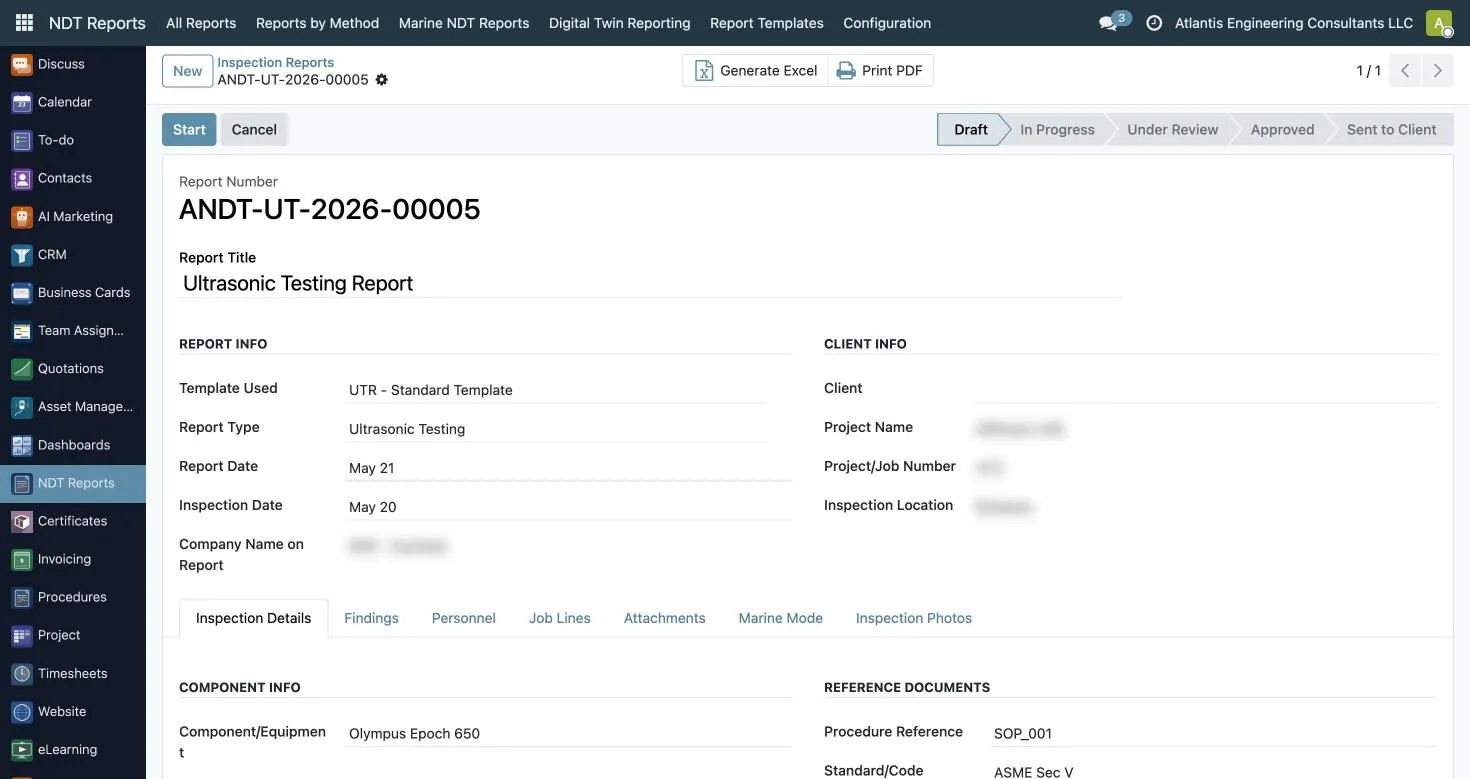
A report is not finished when the technician finishes it. It is finished when a qualified reviewer has checked it and it has gone to the client. The Atlantis report workflow runs draft, in progress, review, approved, sent. The inspector, reviewer and approver each sign, and there is space for a third-party or authorized inspector name and signature, which matters on code work where an AI from the jurisdiction or an owner's inspector witnesses the test.
This workflow is what separates NDT reporting software from a PDF generator. You can see which reports are stuck in review, which have been approved but not sent, and who signed what. When a client disputes a result six months later, you are not digging through email to find out which version went out.
For marine and offshore work, marine mode adds a vessel cover page and photo, inspection location and dates, and builds a PDF that merges the classification society certificate (from a library covering DNV, ABS, Lloyd's Register, BV, RINA, IRS and ClassNK), the inspector's Level II certificate and the calibration certificate. That is the pack a class surveyor on the Gulf Coast or in a Canadian shipyard expects to see, generated rather than assembled by hand. If you want to see a full review cycle on your own report formats, book a reporting demo.
Field capture that works without signal
Refineries, tank farms, offshore platforms and the inside of a vessel all have one thing in common: poor or no mobile signal. NDT software that needs a live connection forces technicians back to paper, and paper means retyping, and retyping means errors. The Atlantis field app is an installable web app that works offline. It stores drafts and photos on the device and syncs when the technician is back in range.
Inside the app a technician picks the method, fills the method-specific fields, captures photos, signs on screen and previews the PDF before submitting. A REST API behind it serves the jobs assigned to that technician and the equipment issued to them, so the report starts pre-linked to the job and the instrument rather than relying on someone typing a serial number correctly at the end of a twelve-hour shift.
This matters more for small and mid-sized contractors than for large ones. A large company can afford a data-entry clerk. A ten-technician shop in the Permian or in Fort McMurray usually cannot, and the owner ends up doing reports at night. Getting the report right at the point of inspection is the single biggest time saving most NDT companies will ever get from software.
NDT Reports: real screens
Screenshots of the reporting app as it runs today. Client, project and inspector details are blurred.
Problem guides
Problem-by-problem guides showing how inspection companies remove them with Atlantis NDT.
NDT report generator or connected system?
An NDT report generator fills a template quickly. The question buyers miss is what happens around the report: who was allowed to sign it, which procedure applied, and whether the instrument was in calibration.
- Report generator. Fast templates per method, usually with no check on certificates or calibration. Fine for a small team with good discipline.
- Connected reporting. The report draws on certificate, procedure and calibration records, so an invalid combination is flagged before the report is issued.
- Digital twin reporting. Readings placed on a 3D model with history across campaigns, for owners who track corrosion over time.
What should I test in a demo of NDT reporting software?
Offline capture on a real job, a method-specific report type you use every week, the review and approval steps, your client report format, and what the system does when a technician's certificate has expired.
Shortlisting NDT software?
Take the buyer checklist into every demo. It covers the enforcement, field, data and exit questions that feature lists leave out.
Best NDT inspection software: why most ranked lists get it wrong
Search for the best NDT inspection software and the first page is mostly ranked lists. Several read as generated rather than tested, and they mix three kinds of product that do different jobs: maintenance systems (CMMS) such as eMaint, Fiix and Maximo, general quality management systems, and a few genuine NDT tools. A CMMS is very good at work orders for an owner's maintenance team, but it does not know what a Level II is, what a written practice requires, or what a UT calibration record must contain. Ranking it against NDT reporting software compares a forklift with a crane.
Start with who you are
If you are an NDT or inspection service company, you need NDT inspection software that tracks technician certificates, equipment calibration, crews, method reports and invoices, which is the comparison set on this page. If you own the assets, such as a refinery, pipeline or plant, you need an inspection data management system (IDMS) that holds thickness monitoring locations, corrosion rates and inspection plans for your equipment; owner-side products lead that category, and the page on inspection management software explains the split. Contractor data then feeds the owner's IDMS; the two systems are not substitutes.
Questions that separate NDT software from a generic tool
- Does it hold personnel certification records by scheme, method and level, with vision examinations?
- Does each method have its own report type, or is there one form with free-text fields?
- Can a reviewer approve and sign a report as a named, qualified user?
- Does it work offline in the field?
- Can the report record which instrument, probe and calibration block were used, and does the equipment record show their calibration status?
- Can the job, timesheet and invoice be linked without re-typing?
A tool that answers yes to most of these belongs on an NDT shortlist. One that answers no to the first three is a different category, whatever the list says.
Instrument software is a separate decision
Flaw-detector and phased-array analysis packages from the instrument makers are essential for acquiring and interpreting data, and they also appear in results for NDT software. They sit upstream of workflow software: the analysed result goes into the report, and the report goes into the job.
Where to go next
For the product view of Atlantis, see NDT inspection software and the NDT management software overview; for a head-to-head with one rival, see DRIVE NDT alternatives. To test the questions above on your own reports, book a demonstration.
Speak to an ASNT NDT Level III
Discuss your inspection requirements with Atlantis NDT. Include the asset, method, location and documents you need reviewed.
See also where AI genuinely speeds up report production, and what actually changes once reports stop being retyped.